Travel expense app: request, book and claim business trips on mobile
The Atlatos app is a travel expense app for the entire business travel process on your smartphone. Travellers photograph receipts, add travel times and submit the expense claim. AI-supported receipt recognition automatically reads out the relevant receipt data and transfers it directly to the travel expense claim. Managers approve requests and expense claims on the go. The app accesses the booking data of Atlatos Profi Traveller, so booked flights, hotels and train journeys are already available in the expense claim.

The mobile layer of an end-to-end process
Many providers understand a travel expense app to be a mobile interface for photographing receipts. We, on the other hand, ask ourselves what the app knows about the trip before the first receipt is uploaded.
The Atlatos app is the mobile layer of our two systems. Content management works with the data from Atlatos Profi Traveller, our booking platform for business travel. The expense allocation plan for the expense claim is supplied by Atlatos Expense Engine, our travel expense software. Travel policy, approval structure and account assignment are therefore automatically taken into account in the app. You do not configure anything twice.
Features of the Atlatos app
Submit and approve travel requests
Requests are submitted and approved on mobile.
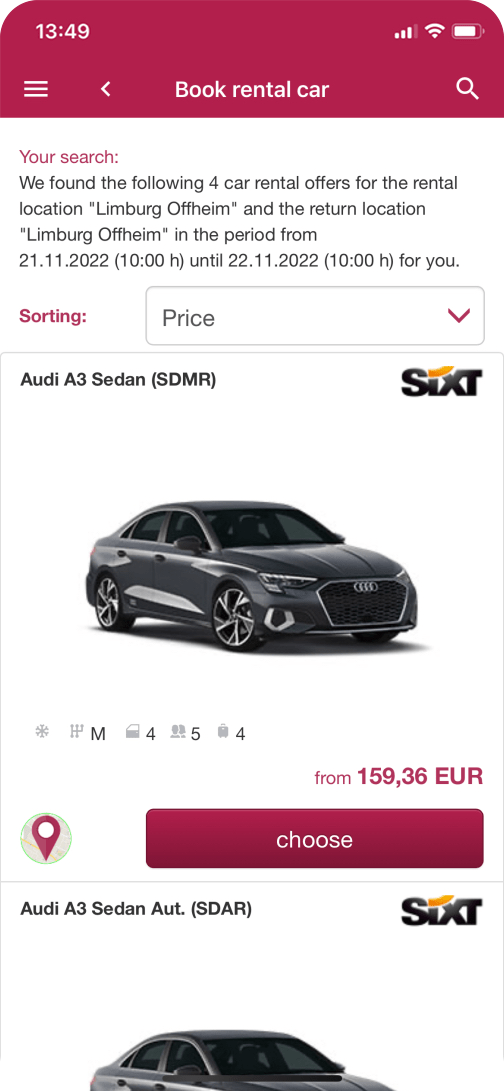
Book flights, hotels, rental cars and trains
The travel policy is applied automatically.
Capture receipts by photo
AI-based text recognition reads out the receipt data and assigns the data to the appropriate fields.
Create and forward expense claims
Expense claims are created on the basis of the booked trip or, alternatively, manually without a template.
Approve expense claims
Approvals take place in several stages if your approval structure provides for this.
Contact travel experts
Contact is possible directly from the app, supplemented by a 24-hour hotline.
Approving between two meetings: the app from the travel manager’s perspective
Approvals are the point at which travel expense processes stall. Not because the decision is difficult, but because the person deciding is not at their PC at that moment. With the Atlatos app, managers approve travel requests and expense claims in a few clicks from their smartphone, including in several stages. They have a transparent view of all their team’s bookings.
As the travel policy already takes effect at the time of booking, all incoming requests comply with the requirements. Time-consuming queries and revisions of requests are therefore no longer necessary. Management tasks that require more data, such as analyses as a basis for negotiating corporate rates, remain on the PC in Atlatos Profi Traveller.
Travel expense claims via app: capture receipts with AI, calculate travel costs and per diems automatically
Travellers photograph the receipt with their smartphone or select a document already saved on the device. The integrated AI reads out the amount, tax information and other details relevant to the claim, assigns them to the appropriate fields and tax codes and transfers them to the travel expense claim. In addition to classic expense receipts, this also applies to entertainment receipts and receipts for gifts.
The recognition accuracy is around 98 per cent. Travellers therefore no longer type in receipt data, but check the recognised details and complete their expense claim much faster. You store one document per item; several receipts for one expense are combined into one file beforehand (JPG, PDF or TIF).
Travellers record travel costs with their private car directly in the app with mileage, licence plate and mileage rate. The system calculates meal and accommodation per diems automatically.

Trips abroad: currency conversion and offline use
The system converts receipts in foreign currencies using exchange rates that are updated daily and archived. If the rate actually charged differs, for example in the case of a card payment with its own exchange rate, travellers enter a different rate.
Booking information remains viewable even without a network connection.

GDPR-compliant, hosted in Germany
The app is designed to be GDPR-compliant and is continuously being developed. Your data is in the same system as bookings and expense claims, hosted in Germany and the EU. Audit-proof archiving in accordance with GoBD is optionally available.

Customers

Users

Transactions per year
We are a member of


What you should measure a travel expense app by
- Data source: Does the app know the booked trip, or do travellers type in flight and hotel data again?
- Receipt recognition: Does the AI only read out the amount, or does it also assign receipt data to the correct fields and tax codes? What about entertainment and gift receipts?
- Approval: Can requests and expense claims be approved on mobile, including in several stages?
- Abroad: Are foreign currencies converted automatically, and does the app work without a network?
- Data storage: Where is the data located, and who operates the data centre?
- Disruption: Is there a person travellers can reach in the event of a rebooking?

Frequently asked questions about the travel expense app
Which devices is the Atlatos app available for?
For iOS and Android. The app is available in the Apple App Store and in the Google Play Store.
How much does the app cost?
The app is part of the Atlatos system solution. The overview of prices and product variants shows which product variant suits your company.
Do I need an Atlatos account for the app?
Yes. The app accesses your company’s configuration, i.e. travel policy, approval structure and expense allocation plan.
Can I also book with the app?
Yes. Travellers book flights, hotels, rental cars and trains directly in the app. The travel policy is stored automatically.
Does the travel expense app recognise receipts automatically?
Yes. The AI reads out the amount, tax information and other details from the photographed receipt and assigns them to the appropriate fields and tax codes, including for entertainment and gift receipts. The recognition accuracy is around 98 per cent. Travellers check the transferred details and correct them if necessary.
Can I claim trips that were not booked via Atlatos?
Yes. In addition to claims based on booked trips, you can create a manual travel expense claim without a template.
How do I find out whether my expense claim has been approved?
The expense claim history shows the current status. You are informed when it is approved. When the reimbursement is paid out depends on your company’s internal processes.
Who can I reach in the event of a rebooking?
A travel expert from within the app, and your personal travel agency partner for complex enquiries. A 24-hour hotline is also available.